Showing posts with label gadgets. Show all posts

Wednesday, June 1, 2011

Bringing more context to Gmail contextual gadgets


As part of the launch of Gmail contextual gadgets, Google released a set of predefined extractors that developers could use. These extractors allow developers to match content within a single part of an email message, such as the subject, and use that content to display relevant information to the current user.

Many Gmail contextual gadget developers have expressed a desire to match on more complex patterns than is possible with the predefined extractors. Today, with the launch of the Google Apps extensions console, these complex patterns, known as custom extractors, are now available to drive contextual gadgets.

Custom extractors allow developers to trigger their gadget when a series of conditions are met. For example, a developer could write an extractor that triggered a gadget only when “Hello world” appeared in the subject and “john@example.com” was the sender of the email. This allows developers to more finely tune their gadgets, and provide even more relevant contextual information.

If you’re interested in writing a custom extractor you can get started by reading our documentation. If you have questions, please post them in the forum.

Monday, April 26, 2010

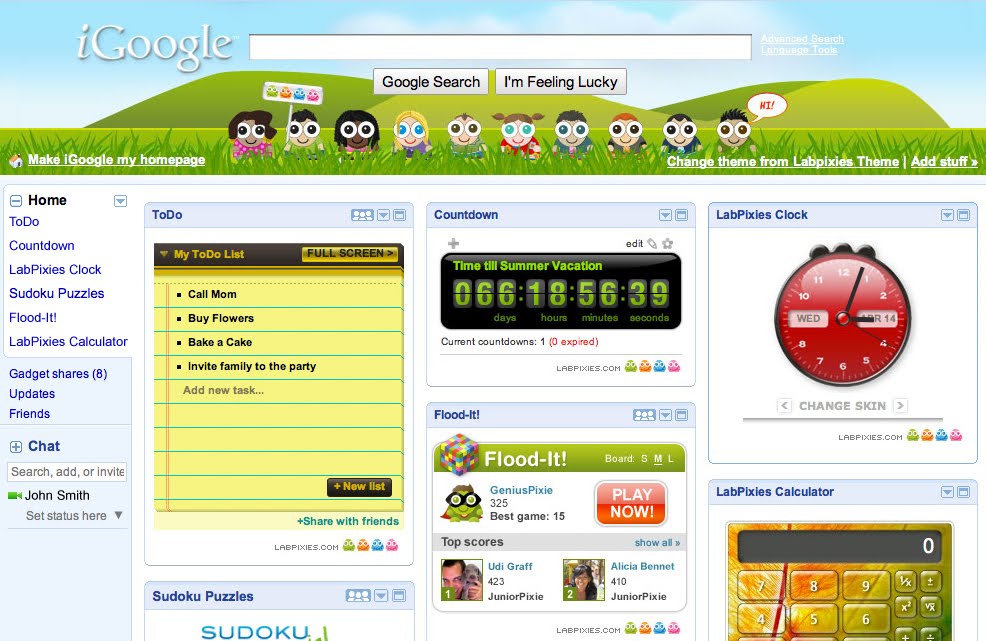
Google acquires Labpixies


Not everyone likes to start their day with just a search box and logo (no matter how cool it is!). Many users want email, videos, news, weather, games, and other information to be at their fingertips each time they open up a browser window. We launched iGoogle in 2005 to address this need by providing a truly personalized homepage with access to any RSS feed and well over a hundred thousand gadgets.

One of the first developers to create gadgets for iGoogle was Labpixies. Over the years, we worked closely together on a variety of projects, including the launch of a number of global OpenSocial based gadgets. Recently, we decided that we could do more if we were part of the same team, and as such, we're thrilled to announce the acquisition of Labpixies.

The team will be based in our ever-growing Tel Aviv office and will anchor our iGoogle efforts across Europe, the Middle East, and Africa. We are looking forward to working with Labpixies to develop great web apps and leverage their knowledge and expertise to help developers and improve the ecosystem overall.

In the meantime, have fun trying to beat me at Flood-It!

Tuesday, April 20, 2010

Hello to orkut Developers!

As we announced in the last update to the former orkut Developer Blog last week, henceforth we’ll be posting all orkut developer updates to this blog.

We think this is also a good opportunity to quickly introduce the newly-launched Developer page to you. We recently added this feature to the orkut sandbox which we hope to be a one-stop solution for developers looking to manage their applications from a single page and view their stats. You can submit your apps directly from here and verify them to complete the submission process. You can also maintain your apps from here and migrate them to a new URL, or delete them entirely from the directory. And if you have applications that have already been approved and included in the directory, expand their details to track the number of installs, uninstalls, renders and other useful stats updated every week.

Here’s what it looks like in action:


Please note that the Developer page requires you to be on the new orkut UI to work.

So keep your apps coming and point your browser to the one page to manage them all: sandbox.orkut.com/Main#Developer. And stay tuned for all orkut updates right here on the Google Code Blog!

Friday, March 12, 2010

Coming soon: Gmail contextual gadgets available for trusted testers

At Campfire One this week we announced that we will soon open Gmail contextual gadgets as a new extension point for developers. These gadgets can smartly draw information from the web and let users perform relevant actions based on the content of an email message, all without leaving the Gmail inbox. For instance, contextual gadgets currently available in Gmail can detect links in emails to show previews of documents, videos, photos, and more, right inside the messages.

For businesses, Gmail contextual gadgets can boost employee productivity by complementing email in a context-specific and actionable way. Appirio, a cloud solution provider, provided a demonstration of the potential of Gmail contextual gadgets and other experimental features
with their new product PS Connect:


Soon we’ll be opening Gmail contextual gadgets as an extension for trusted testing by developers. If you have a good idea for this type of gadget today, please fill out this form. And for those of you who will be attending Google I/O in May, be sure to check out our session on building Gmail contextual gadgets.

Monday, September 14, 2009

Legacy gadget API deprecation

If you're a gadget developer, you've probably used the gadgets.* API, a re-namespaced and improved version of the original legacy, or _IG_*, gadgets API. The gadgets.* API has gained wide acceptance, both on Google and non-Google gadget containers, and is the standard API for gadget development.

However, there remains a number of gadgets using the legacy API, primarily gadgets developed for iGoogle, and the time to upgrade those gadgets is now. As of today, the legacy gadgets API is officially deprecated. For a period of one year, gadgets using the legacy API will continue to be supported, and function. After that, the legacy API will be turned off for the majority of Google containers (such as iGoogle, orkut, Gmail, and Calendar).

For more specifics on how the deprecation affects iGoogle developers, and details on coming resources to help in the API transition, check out this post on the iGoogle developer blog.

Wednesday, August 12, 2009

iGoogle adds support for OpenSocial

Developers using the OpenSocial API can now reach tens of millions of iGoogle users! As of this week, iGoogle now supports OpenSocial in both the US and Australia, with the plan to roll it out to more users soon. In general, we think "social is better" when it comes to the web - activities such as reading the news, doing a crossword puzzle, sharing a todo list, or watching a video are all better when done with a friend. These are all things that iGoogle users love to do, so making them social on iGoogle was the next logical next step.

If you're interested in getting started writing social gadgets for iGoogle, check out the full announcement on the iGoogle developer blog.

Thursday, October 16, 2008

iGoogle launches canvas view

By Dan Holevoet, Developer Programs

We're happy to announce the launch of the canvas view feature to iGoogle users in the U.S., rolling out over the course of the day.  The canvas view feature allows gadget developers to build richer content, games, and UI for iGoogle's tens of millions of users by allowing them to build powerful full-page applications. In addition, canvas view provides developers with the opportunity to monetize their gadgets.


To get started, check out the documentation and examples on the iGoogle developer website. The site includes detailed information about iGoogle as well as information on upcoming OpenSocial functionality.

Try out the updated version of iGoogle and check out some of the great canvas view gadgets developers have already built.

Wednesday, June 11, 2008

Age-Appropriate Gadgets

In today's New York Times [HT: Andrew Leigh], an article about growing up with gadgets. There is not much in there that isn't just plain common sense. After all, you may read about some 2 year old using a computer but in actuality that is a rare, rare event.

We have had mobile phone discussions in our family but basically, until they are out on their own there is no need. Our 9 year old says the school doesn't allow them and being so damn obedient there, she would likely refuse one if offered. Our 7 year old, on the other hand, wants nothing less than an iPhone but that is for a different reason that I'll come to in a second.

That said, our kids are hardly gadget free. The two eldest have iPods and DSs that we have found invaluable when traveling. The 3 year old wants them too but doesn't care as much about whether they work. So she has been given a iPod cardboard cut out from one of our iPod accessories and she is happy with that. That said, there is something a little sad in that whole transaction and I'm sure she will have the three dimensional variety soon enough.

It is my 7 year old son that is the gadget fan and there is little holding him back. He gladly watches all of the ads and video demonstrations on apple.com. He feels our house deserves a MacBook Air for the excellent reason that it is currently the best. We have resisted. But following on the New York Times article, he will do anything so long as it is on a computer. I downloaded the wonderful MIT programming software Scratch. It is a programming environment for kids and he quite happily develops animations and stories on it.

But now that he saw Steve Job's keynote on the iPhone applications and the demonstration of how easy it is to write applications with the SDK, he has become very interested in that. So we have officially registered as an Apple Software Developer and have downloaded the software. It is tricky but there are lots of video guides.

And what am I really after in all of this? Basically, what I want is a headline: "7 year old programs and launches software on the iPhone App Store." If we can manage that, he can have an iPhone for his 8th birthday.

Thursday, January 3, 2008

Google Developer Courses on YouTube


Wow, it's been nearly 4 months since we started the Google Developers channel on YouTube! We wanted a place to post talks, announcements, interviews, and anything else that might interest outside developers (and other fans). Now, we're building out more tutorial / lecture content -- something that hobbyists and seasoned programmers can watch to get their feet wet with our products.

We know that one of your New Year's resolutions must be to learn a new API, so check out our first videos on Gadgets and Google Data:

Three videos about Getting Started with Gadgets by "the Dans" (Daniel Lee and Daniel Holevoet):


An Introduction to Google Data by Jeff Fisher:


We're just getting started, so subscribe to the Google Developer Courses playlist for updates. There are many ways for you to keep up to date:

You can subscribe through YouTube by clicking the "Subscribe" link here:
http://www.youtube.com/profile_play_list?user=GoogleDevelopers.

Or, add the playlist directly into Google Reader or iGoogle:
Add to Google

Finally, you can also put the Google Data feed into your reader of choice: http://gdata.youtube.com/feeds/playlists/A930398A6117E70C

Let us know what you think! If there are any particular tutorials you'd like to see, post a comment below.

Thursday, November 29, 2007

Google Gadgets going cross-platform


For about two years now, people have been writing gadgets for Google Desktop on
Windows and for iGoogle on the web. Today, with the announcement of Google
Gadgets for Mac OS X, Google Desktop users on the Mac can now run the same
Windows and web-based gadgets in Apple's Dashboard with zero (or very few)
changes. Check it out for yourself.

Google Gadgets for the Mac uses WebKit's JavaScript engine inside Dashboard, so
the majority of gadgets just work if they're written properly. The rest can be
fixed by following a few guidelines:
  • Use JavaScript, not JScript
    • WebKit is case-sensitive, JScript is not, which can lead to problems if you assume can you do things like interchange SetTimeOut() and setTimeout().
    • Avoid JScript-only features like collections and ActiveX.
    • Avoid IE-specific DOM extensions, just as if you were writing a multi-browser web application.
  • Avoid Windows-specific APIs
    • You shouldn't assume ActiveX or certain DLLs are available. Neither WebKit nor Mac OS X supports ActiveX, so these gadgets must be rewritten.
    • Avoid Windows-only APIs such as Google Talk. These APIs are not (yet) available on Mac OS X.
  • Understand how Dashboard is different
    • The Dashboard environment is very different from a web page or the Desktop sidebar on Windows in that it comes and goes as the user activates it. Don't rely on your gadget always being visible. Your gadget won't run or update when Dashboard isn't in the foreground.
    • Don't rely on access to the file system. The security model for Dashboard doesn't allow arbitrary file access to the hard disk, although your gadget does have access to files in its own archive. Things like file pickers won't work. Note that while restricted file system access is a departure from how gadgets work on Windows, it's consistent with Dashboard's security model and the behavior of other widgets developed for Mac OS X.

For more details, see Writing a Cross-Platform Gadget, part of the Desktop Gadget API documentation.

If you're interested in developing your own gadget, visit the Gadgets API homepage. If you're already a gadget developer, download the beta today to test your gadget and ensure that it works correctly.